




Enabling Enterprise-Scale Threat Investigations with a Browser-Based Intelligence Extension

Executive Summary
Validating and investigating indicators often requires analysts to manually switch between multiple tools, including threat intelligence platforms and SIEM systems. Security analysts frequently rely on external research sources such as threat reports, blogs, and vulnerability databases to investigate potential threats. In high-volume environments, this repetitive process not only impacts analyst productivity but also delays timely threat validation.
To address this challenge, Crest Data developed a browser extension that integrates directly with the threat intelligence platform and the SIEM platform. The extension automatically detects indicators on webpages and allows analysts to instantly perform threat intelligence lookups, check SIEM sightings, and enrich threat intelligence records without leaving the browser (or even a current tab). This significantly reduces context switching and accelerates investigation workflows. As a result, security teams can improve investigation speed while maintaining consistency across workflows.
About the Customer
The customer is a cybersecurity organization focused on threat intelligence operations and security monitoring. Their security analysts regularly investigate threat reports, open-source intelligence (OSINT), and security research to identify indicators of compromise (IOCs) relevant to their environment, using threat intelligence management platforms and SIEM tools for lookup and incident investigation.
Customer Challenge
Security investigations often begin with external research. Analysts review blogs, threat reports, vulnerability disclosures, and other intelligence sources that contain numerous indicators such as:
- IP addresses
- Domains
- URLs
- File hashes
- CVEs
- Adversaries
- Attack techniques
To determine whether these indicators are malicious, analysts typically follow a repetitive workflow:
- Identify an indicator on a webpage.
- Copy the indicator.
- Search for it in the threat intelligence platform. If not present, then create the indicator.
- Switch to the SIEM to check whether the indicator appears in internal logs.
- Return to the research page and repeat the process.
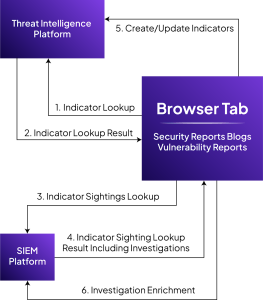
This manual process creates several operational challenges:
- Frequent context switching among research sources, threat intelligence platforms, and the SIEM platform
- Time-consuming manual lookups for each indicator
- Requires manual effort for indicator creation and keeping personal notes for consolidated indicator information
- Higher cognitive load for analysts during investigations
- Delayed threat validation and triage
When investigating large threat reports containing dozens or even hundreds of indicators, these inefficiencies significantly slow down investigations and reduce analyst productivity.
Proposed Solution
Crest Data built a browser extension designed specifically to streamline threat investigation workflows.
The extension integrates directly with:
- Threat Intelligence platform for threat intelligence lookup, enrichment, and indicator management
- SIEM platform for sightings and incident investigation
Once configured with the appropriate platform credentials, the extension automatically scans webpages and detects indicators present in the content.
Instead of manually looking up each indicator, analysts can interact with them directly within the webpage to perform intelligence lookups and SIEM investigations instantly.
This approach transforms the browser into an interactive threat investigation environment, enabling analysts to validate indicators and enrich intelligence without leaving their research context. Also provides the ability to store the indicators analysis intermittently that allows analyst to consolidate the analysis from various sources.
Implementation
The browser extension was designed to support two primary investigation workflows: inline indicator interaction and holistic page intelligence analysis.
Inline Indicator Investigation
After configuration, the extension automatically scans webpages for security indicators such as IP addresses, domains, URLs, hashes, CVE, adversaries, attack patterns etc.
Scanned indicators are highlighted directly on the webpage, allowing analysts to immediately identify the Indicator of Compromise(IOC) within the content they are reviewing.
By hovering over a highlighted indicator, analysts can open an interactive pop-up that provides quick access to:
- Threat intelligence lookup result
- Indicator metadata and context
- SIEM sightings
From this pop-up, analysts can perform several actions without leaving the page, including:
- Performing threat intelligence lookups
- Checking SIEM sightings for the indicator
- Enriching threat intelligence records with additional context
- Updating related investigations or incidents
This inline investigation capability significantly reduces the friction associated with manual lookups.
Extension Popup for Holistic Page Analysis
In addition to inline interaction, the extension provides a centralized pop-up interface that offers a comprehensive view of indicators detected on the current webpage.
The pop-up aggregates information such as:
- Indicators
- Adversaries
- Attack patterns and TTPs
- Threat intelligence reports
This unified view enables analysts to quickly understand the overall threat context on the webpage they are analyzing.
The pop-up also enables bulk operations, allowing analysts to:
- Investigate multiple indicators simultaneously
- Save indicators for later analysis
- Perform bulk lookups in the Threat Intelligence and the SIEM platform
- Capture intelligence from the webpage into the threat intelligence report
Outcomes & Success Metrics
Reduced Context Switching
By bringing threat intelligence and SIEM insights directly into the browser, analysts no longer need to constantly navigate among multiple tools during investigations.
Faster Threat Validation
Instant lookups allow analysts to quickly determine whether indicators are malicious and whether they appear in organizational telemetry.
Improved Analyst Productivity
Automated indicator detection and bulk investigation capabilities reduce manual tasks and accelerate research workflows.
Enhanced Intelligence Enrichment
Direct integration with the Threat intelligence platform allows analysts to enrich threat intelligence records while conducting research, ensuring insights are captured immediately.
Persistence context storage
Persistent storage allows analysts to store relevant information from multiple sources, enabling them to consolidate threat information.
About Crest Data
Crest Data is a data and AI-driven technology solutions provider for enterprises and technology innovators in cybersecurity and observability. The company focuses on building practical, integration-led solutions that simplify complex security operations, as demonstrated in this engagement by streamlining threat investigation workflows and improving analyst efficiency within existing security environments.