



Intelligent SAM on ServiceNow: Automated Licensing & Provisioning
Executive Summary
In the modern IT landscape, Software Asset Management (SAM) is a critical function that ensures efficient and compliant usage of software across an organization. However, the manual effort involved in SAM tasks including software request fulfillment, license management, and software model creation can be time-consuming and prone to human error, impacting operational efficiency and accuracy.
To address this challenge, Crest Data implemented an automated SAM solution on ServiceNow to streamline end-to-end workflows. By reducing manual intervention and standardizing processes, the solution enables faster software provisioning, improved license management, and more efficient operations for SAM administrators.
About the Customer
The customer is a global enterprise platform team managing large-scale IT and asset management operations, with a focus on efficiency, scalability, and governance.
They operate in a high-volume environment, handling Software Asset Management (SAM) processes such as software requests, license management, and compliance, requiring seamless coordination across systems to ensure efficient software provisioning.
Customer Challenge
SAM admins are responsible for managing software assets throughout their lifecycle, which includes tasks such as:
- Verifying if software models and licenses exist
- Ensuring software installations and updates are completed
- Handling license entitlements and renewals
The main challenges faced by SAM admins include:
- Manual entry and verification of software models
- Checking software availability and creating catalog task for purchasing
- Managing software license entitlements manually
- Ensuring compliance and optimizing software usage
These tasks are handled manually, often resulting in delays, human error, and inefficiencies in ensuring that the right software is available and licensed for end-users.
Proposed Solution
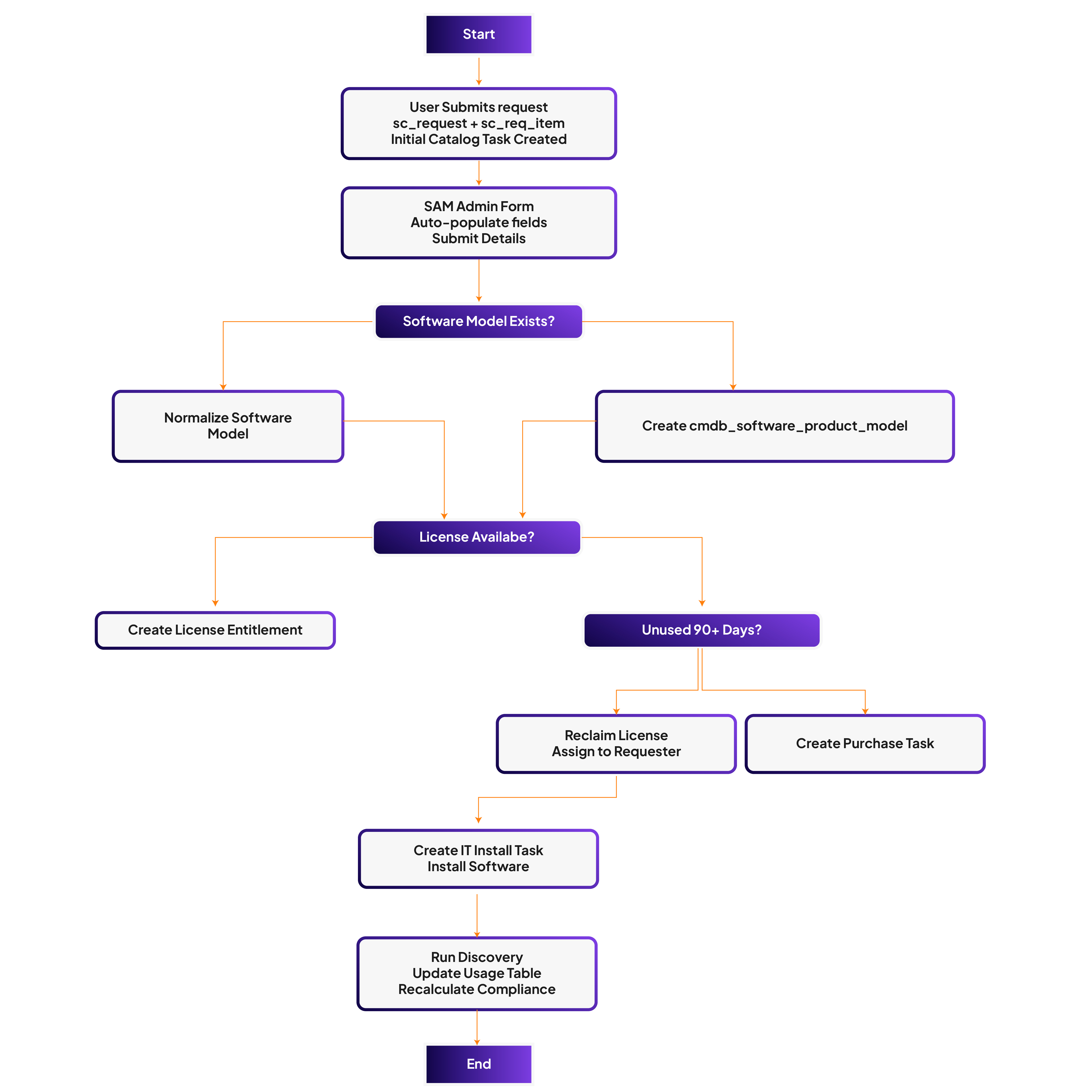
To address these challenges, the organization implemented an automated SAM process through a robust integration with ServiceNow, enabling an end-to-end workflow that eliminates manual tasks and enhances operational efficiency. The process includes:
- Service Catalog Integration
- Users initiate requests for software via the Service Catalog, specifying the software they require. This generates an entry in the sc_request and sc_req_item tables, and triggers the creation of a catalog task for verification.
- At this stage, the SAM admin is required to verify if the requested software is already available in the system.
- SAM Admin Form for Software Model Entry
- When a SAM admin receives a software request,In SAM automated integration SAM admin will be presented with a form that includes essential fields, such as:
- Reference of Request Item (link to cmdb_software_product_model)
- Publisher (reference to core_company)
- Product Name, Version, Edition, Platform, Software Category
- License/Entitlement Information (linked to alm_license)
- License Type, License Metric, Purchased Rights, Entitlement Dates
- Upgrade Rights, Downgrade Rights, and Description
- The form is designed to automatically populate fields based on data retrieved from the requested catalog item. For instance, Publisher, Version, and Product Name can be auto-filled if they are available from the catalog request. If not, the SAM admin manually enters the information.
- When a SAM admin receives a software request,In SAM automated integration SAM admin will be presented with a form that includes essential fields, such as:
- Discovery Integration for Software Model Validation
- Once the SAM admin completes the form, the integration automatically checks if a corresponding software model exists in the CMDB using the Discovery tool.
- If a software model already exists, the software details are normalized to align with existing records.
- If no software model exists, an automated process creates a new entry in the cmdb_software_product_model table. This eliminates the need for manual effort in finding and creating software models.
- Automated Catalog Task Creation for Software Purchase
- If a software model is found, the system updates the status of the sc_req_item and the catalog task (confirming that the software is already available and does not need to be purchased).
- If no software model is found, the system update catalog task for the purchase of the software, ensuring that the SAM admin does not have to manually initiate a purchase request.
- License Management and Entitlement Checks
- The next step in the integration is to check if the required license for the software is available.
- If a license exists, the system automatically assigns entitlement to the requestor.
- If no license is available, the system initiates an automated flow to check the Software Usage Table for unused licenses.
- The next step in the integration is to check if the required license for the software is available.
- License Reallocation and Inactivation Process
- If the system detects that a license has been unused for 90 days, an automated email is sent to the current user informing them that the software will be deactivated in 3 days unless they respond.
- If no response is received within 3 days, the software license is reallocated to the new requester.
- Simultaneously, an email is sent to the new requester, confirming that their request is being processed.
- Software Installation Task Creation
- Once a software license or software model is confirmed, an automated task is created for the IT team to install the software on the requestor’s machine.
- Once a software license or software model is confirmed, an automated task is created for the IT team to install the software on the requestor’s machine.
Once the IT team updates the catalog task with the installation status, an automated process triggers Discovery to ensure that the software installation is compliant and updates the Software Usage Table.
Automation Process Flow:
- Service Catalog Request → Create sc_request, sc_req_item, and Catalog Task for software verification.
- SAM Admin Form → Auto-populate details, verify or create new software model in CMDB.
- Discovery Check → Validate software model existence and normalize data.
- Catalog Task Creation → Initiate purchase request if software is not available.
- License Check → Verify license availability; reassign or issue new license based on usage.
- Inactivation Process → Auto-deactivate unused software after 90 days, reassign software to new requester.
Installation Task → Auto-create IT installation task once software and license are confirmed.
Outcomes & Success Metrics
The integration of automated workflows into the SAM process significantly reduces the manual burden on SAM admins. With the automated system in place, the organization can ensure faster, more accurate software provisioning and license management, while also maintaining compliance with software usage policies. By eliminating manual steps such as finding or creating software models, verifying license availability, and managing inactivation processes, the organization can focus on more strategic tasks, improving overall efficiency and reducing operational costs.
This transformation delivered the following measurable outcomes:
- Increased Efficiency: Automating routine SAM tasks such as software model creation, license management, and entitlement assignment reduces manual work for SAM admins.
- Reduced Errors: Auto-population of fields and automatic discovery reduce the chances of human error.
- Faster Software Delivery: By automating the software verification and procurement process, software requests are fulfilled more quickly.
- Improved License Utilization: The automated license reallocation process ensures that unused software is assigned to users who need it, optimizing software costs.
- Enhanced Compliance: Continuous monitoring and automated updates to the software usage table ensure compliance with licensing agreements and software policies.
- Cost Savings: The automation of software procurement and license management reduces administrative overhead, helping the organization save on software acquisition costs.
About Crest Data
Crest Data is a data and AI-driven technology solutions provider for enterprises and technology innovators across workflow automation, cybersecurity, and observability. We help organizations design, build, and scale intelligent systems powered by automation and AI.
As a ServiceNow technology partner, Crest Data brings deep platform expertise to modernize operations, optimize workflows, and accelerate digital transformation through scalable, enterprise-grade solutions.