AI-driven Migration to Splunk
Elasticsearch to Splunk Migration
Automated Tool for Hassle-free, Error-free Migration
At a Glance
Automated Process
Zero-touch dashboard migration with real-time progress tracking
Reduced Migration Time
Dashboard migration time cut from weeks to hours
Reduced Operational Cost
$100K+ cost savings to migrate 1,000 charts
Customers often begin their journey of gaining operational intelligence with an open source platform as the barrier to entry is low. But as the monitoring or analytics teams find more use cases they run into several problems:
- Security use cases may not be supported
- Broad integration ecosystem may be missing
- Community-based support makes it difficult to commit to SLAs
- Managing large-scale deployment costs more time & money
So, as the analytics journey of Enterprises mature and customers realize the need to migrate from Elasticsearch, customers often find that their “sunk” investment in Elasticsearch to be a major impediment to migration to Splunk.
Highlights
Features at a Glance
Automated Process
- Zero-touch Dashboard Migration
- Migrate Hot, Warm, and Cold Bucket Data seamlessly
- Real-time Progress Tracking
Reduce Migration Time
- Reduce Dashboard Migration Time from Weeks to Hours
- Preview Charts before Migration
- Use automation to replace tedious error-prone manual tasks
Reduce Operational Cost
- Human effort shifts from manual migration to verifying business logic
- Save up to 20X reduction in time to migrate
- $100K+ cost savings to migrate 1,000 charts
Product Snapshots
Inside the Migration Tool
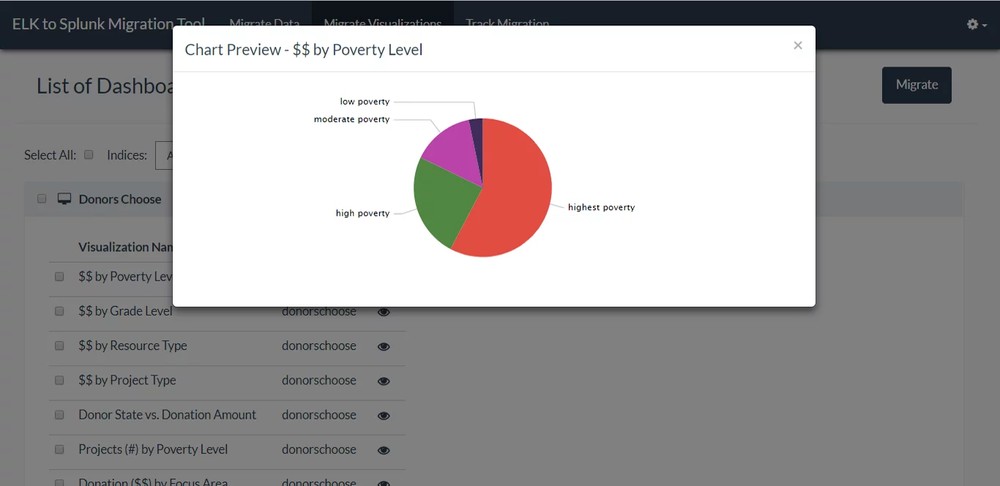
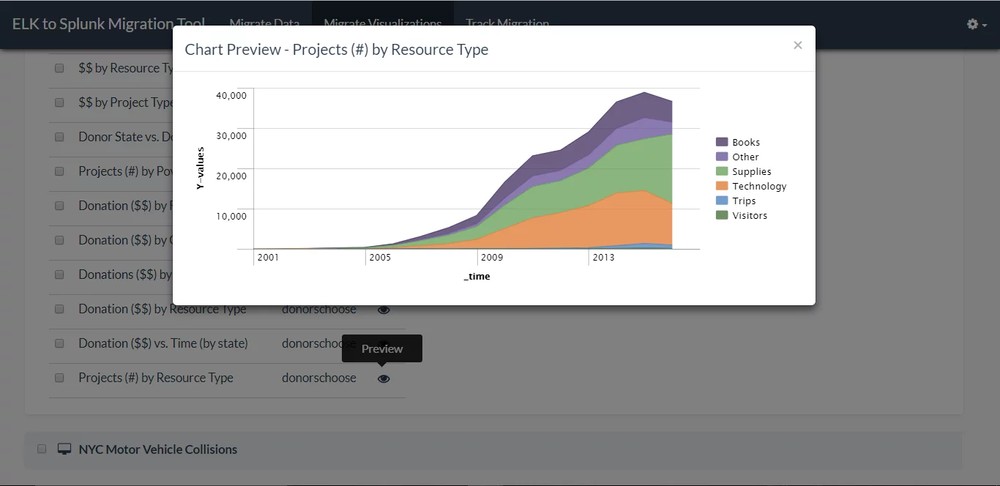
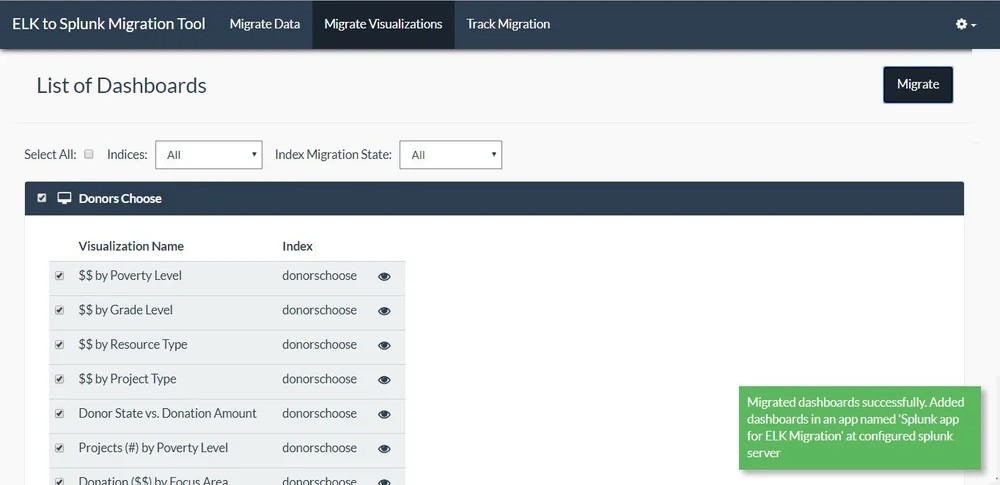
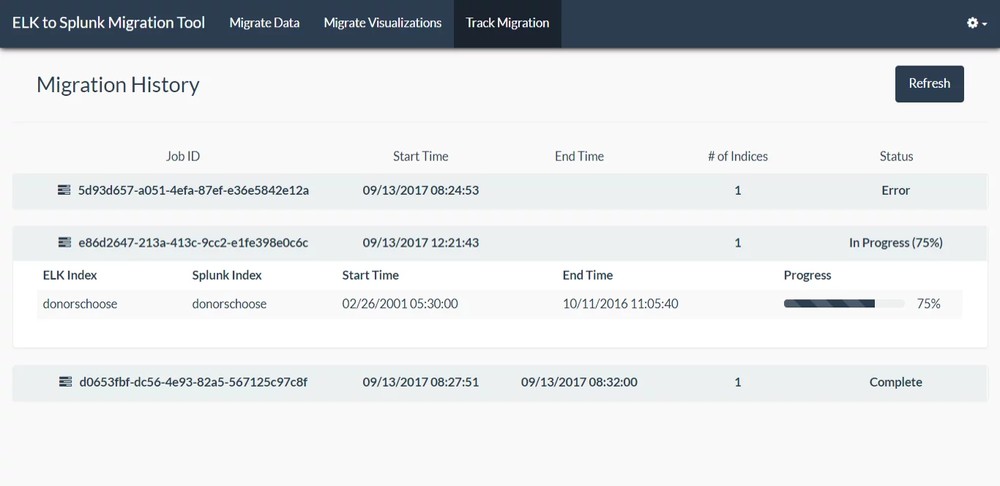
Preview charts before you commit, then migrate and track every visualization from Elasticsearch into Splunk.
1 / 4

01
Chart Preview by Poverty Level

02
Chart Preview of Projects by Resource Type

03
Migrate Visualization

04
Track Migration
How It Works
Major Functions of the Migration Tool
The tool automates the tasks of migrating data and visualizations from Elasticsearch, triggering actions such as creating a Splunk Index, migrating specific data from any index to another, and migrating dashboards and visualizations.
1
Index Data Migration
Migrate index data from the ELK server with the option to select the start and end-date of events (per index).
2
Visualization Discovery
List and migrate all visualizations per dashboard and the name of the index used to create the visualization.
3
Real-time Tracking
Real-time tracking of index data migration from ELK to Splunk.
4
Live Preview
Live-preview of the migrated visualizations in the Splunk environment, so the administrator can checkpoint prior to automatic migration.
Migration by the Numbers
Scale that backs every Elasticsearch to Splunk migration
0
Time reduction for dashboard migration.
0
Cost savings in migration.
0
To migrate & validate 1TB of data.
Why Choose Crest Data
Proven expertise, backed by purpose-built migration tooling
Industry-Leading Expertise
- With over 100 migrations delivered across various observability, SIEM and cloud platforms
- Crest Data has earned a reputation as a trusted partner
Implementation Excellence
- Get tailored guidance from our experts
- To ensure a smooth, successful migration
Validate Before You Commit
- Preview charts in Splunk before migration is committed
- Real-time progress tracking from ELK to Splunk
Full Data Coverage
- Migrate Hot, Warm and Cold bucket data seamlessly
- Select the start and end-date of events, per index
Ready to migrate?
Talk to our migration experts and kick off your Elasticsearch to Splunk journey with confidence.
Frequently Asked Questions
Elasticsearch to Splunk Migration FAQs
Answers to the questions we hear most often about migrating from Elasticsearch to Splunk with Crest Data.
-
Elasticsearch is a distributed search and analytics engine at the core of the Elastic Stack — which also includes Logstash for data ingestion, Kibana for visualization, and Beats for lightweight data collection. Together, these components form a comprehensive platform for log management, full-text search, security analytics, and operational intelligence.
Elasticsearch stores data as indexed JSON documents and uses its own query language (Elasticsearch Query DSL and KQL) for fast search and aggregation across large data volumes. It is widely adopted across enterprises for use cases spanning IT operations, application monitoring, security event analysis, and business intelligence. When organizations decide to transition their Elasticsearch environment to Splunk, Crest Data’s migration platform handles the full process — automating index data migration, KQL-to-SPL query conversion, and dashboard recreation — ensuring continuity of your analytics operations throughout.
-
Elasticsearch works by ingesting data — typically JSON documents — and indexing it across a distributed cluster of nodes. Each document is processed through an analysis pipeline that tokenizes text, applies filters, and stores the result in an inverted index, enabling fast full-text search and aggregation queries at scale.
Data can be ingested directly via the Elasticsearch API, through Logstash pipelines, or using Beats agents deployed on source systems. Kibana provides the visualization and dashboard layer on top of Elasticsearch, allowing users to build charts, tables, and operational dashboards from the indexed data.
When migrating from Elasticsearch to Splunk, the data stored across Elasticsearch indices is extracted and re-ingested into Splunk’s indexing layer. Crest Data’s migration engine manages the index-by-index data transfer, including date range selection, and provides a live preview of migrated visualizations in the Splunk environment before the final migration is committed — allowing your team to validate accuracy before go-live.
-
Splunk is a platform for searching, monitoring, and analyzing machine-generated data — including logs, events, metrics, and security telemetry — from across an organization’s IT infrastructure. It is widely used for IT operations intelligence, security information and event management (SIEM), application performance monitoring, compliance reporting, and operational dashboards.
Splunk uses its proprietary Search Processing Language (SPL) for querying data, and provides a rich ecosystem of apps and integrations through Splunkbase. For organizations migrating from Elasticsearch to Splunk, the primary change is in the query language (from KQL/Elasticsearch DSL to SPL), the data ingestion model, and the dashboard environment (from Kibana to Splunk dashboards).
Crest Data’s migration platform automates the conversion of Kibana dashboards into Splunk dashboards and translates Elasticsearch queries into SPL, minimising the relearning burden for your team and ensuring your existing analytics and monitoring workflows are preserved in the new environment from day one.

Talk to Our Experts
Start your Elasticsearch to Splunk migration today
Ready to transform your ideas into reality? Get in touch with our experts today and explore how we can partner for your success.