

Grafana Marketplace
Commercial Plugin
Prisma Cloud CSPM Plugin for Grafana
Bring cloud security posture into Grafana

Built for
14
Query types
4
Bundled dashboards
0
Agents or exporters required
≥ 13.1
Grafana version supported
Overview
Monitor Prisma Cloud CSPM directly inside Grafana
Prisma Cloud CSPM REST API
Access Key authentication
Alerts, compliance, assets, and vulnerabilities
Strictly read-only, server-side data access
The Prisma Cloud CSPM plugin is a backend data source plugin that lets you query and visualize security alerts, compliance posture, asset inventory, vulnerability prioritization, and licensing from Palo Alto Networks Prisma Cloud CSPM directly in Grafana. Cloud security and platform teams get posture and risk in the same dashboards they already use for the rest of their stack.
Prisma Cloud CSPM is the Cloud Security Posture Management side of Prisma Cloud. The plugin talks to the Prisma Cloud CSPM REST API to bring your posture into Grafana: what is alerting right now, which compliance standards you are failing and how that is trending, which individual resources are misconfigured, which CVEs to fix first, and how much of your license you are consuming, all strictly read-only, all server-side, from a single pane of glass. (This is the CSPM plugin, a separate product surface from Prisma Cloud Compute (CWPP), which uses a different host, credential, and API.)
Coverage
What You Can Monitor
The plugin exposes 14 query types, selectable in the query editor, with server-side filtering pushed into the Prisma Cloud API, severity, alert status, cloud type, compliance standard, asset and resource type, lifecycle stage, and account IDs. The editor states each query type's time behavior inline: three honor the dashboard time range, the rest are snapshots or vendor-fixed trailing windows, so a narrowed range never silently returns nothing.
Alerts, Audit & Inventory
Triage security alerts within the time range by severity, status, policy, cloud, and resource, read the tenant administrative audit trail as a Logs panel (who did what, when, and the result), inventory every onboarded cloud account with status and protection mode, and get tenant-wide asset inventory with passed, failed, and unscanned resource counts broken down by cloud and severity.
alerts
audit logs
cloud accounts
asset inventory
severity
Compliance Posture
Compliance Posture
See current compliance status per standard with passed, failed, and assigned-policy counts and a tenant-wide summary row, track how that posture trends across the dashboard time range, and drill into individual cloud assets with their alert, vulnerability, and policy- scan status through Asset Explorer, so teams know exactly which standards they are failing and which resources are driving it.
standards
compliance trend
asset explorer
policy scans
failed resources
Vulnerabilities & Licensing
Prioritize remediation with vulnerability burndown over a trailing 30 days, prioritized vulnerabilities by category (urgent, exploitable, patchable, in-use, internet-exposed), a per-CVE overview with CVSS, EPSS, and impacted-asset counts, and the asset breakdown for any single CVE. Watch code-to-cloud deploy and runtime trends, and track licensed resource consumption against what was purchased.
burndown
prioritized vulns
CVE/EPSS
code-to-cloud
licensing
Pre-Built Dashboards
Ready-to-use Prisma Cloud CSPM dashboards in Grafana
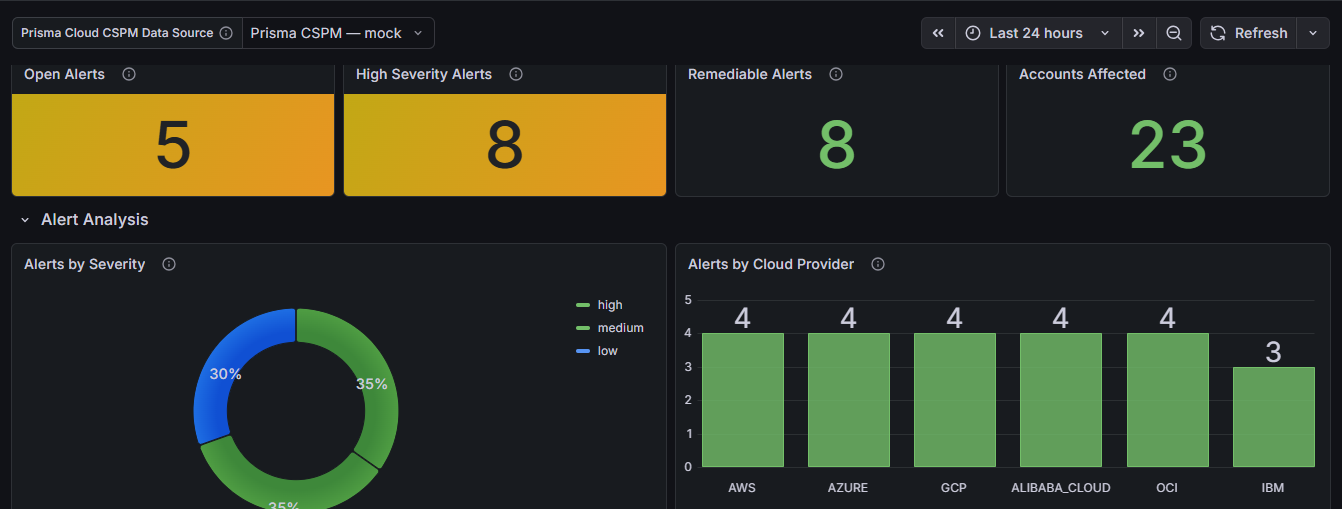
The plugin ships with four curated dashboards covering the cloud estate, alerts and audit logs, compliance and vulnerabilities, and security trends and licensing.
1 /
5
01
Prisma Cloud CSPM Overview
Cloud estate, asset inventory posture, and current alert volume.
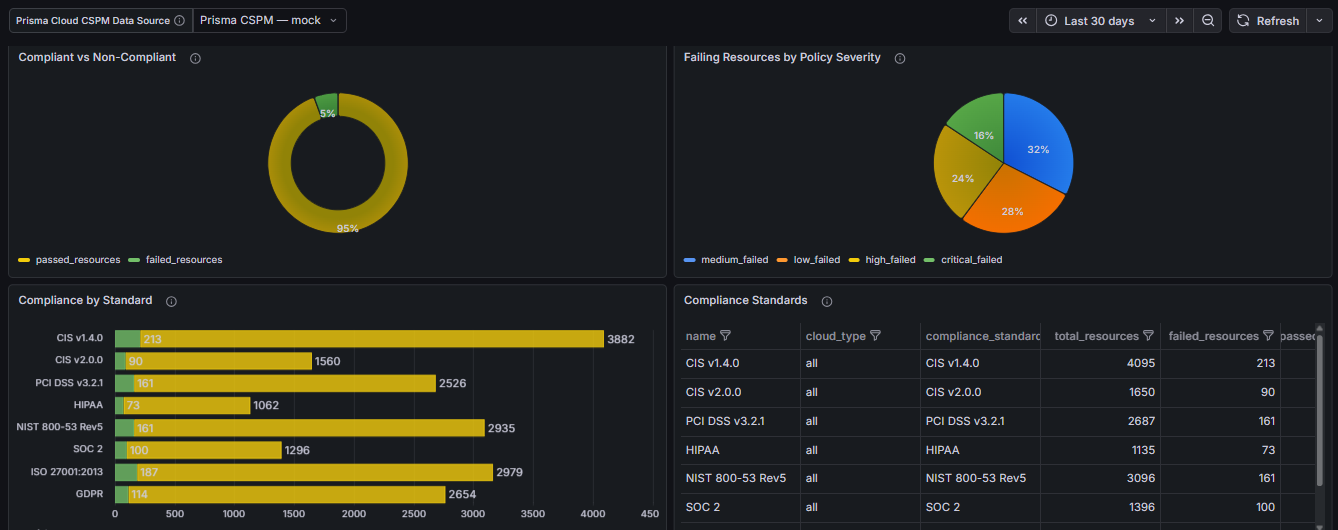
02
Prisma Cloud CSPM Alerts & Audit Logs
Alert triage, severity, status, provider and top triggering policies, plus the administrative audit trail. Every panel follows the time picker.
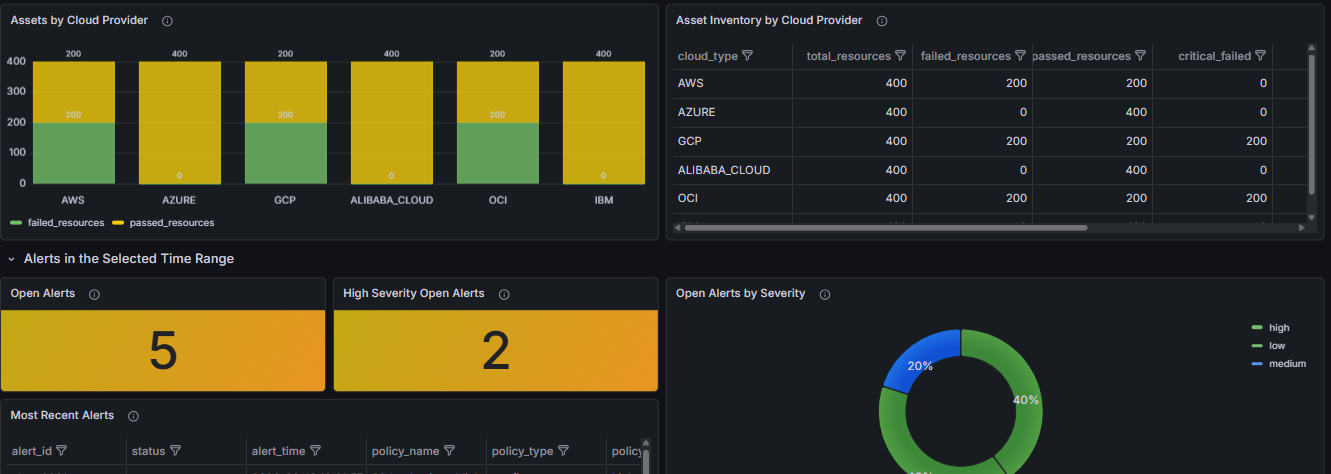
03
Prisma Cloud CSPM Compliance & Vulnerabilities
Compliance posture per standard, its trend over the selected range, and vulnerability prioritisation and burndown.
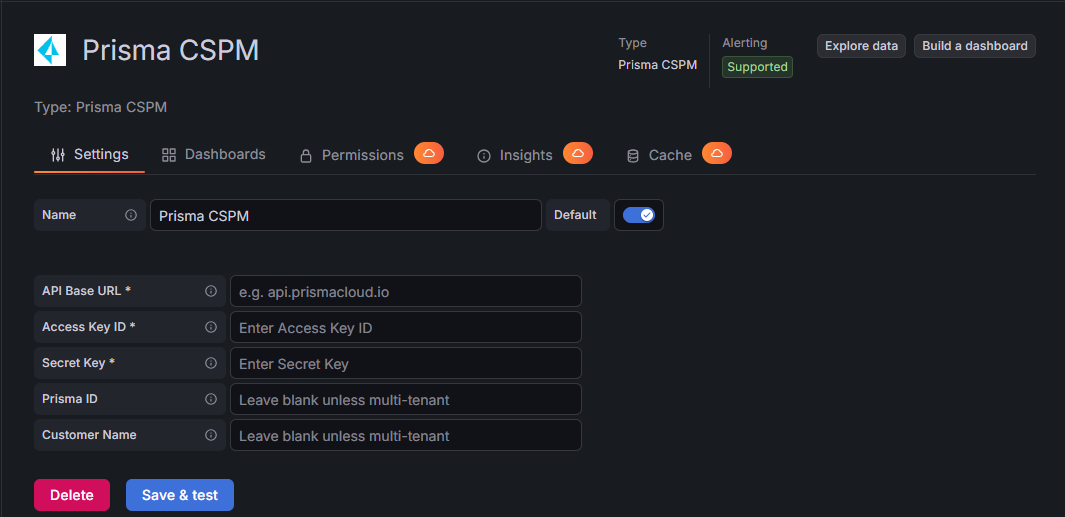
04
Data Source Configuration
Enter your tenant's API Base URL with the Access Key ID and Secret Key, then click Save & Test. The health check performs a real login and confirms a session token comes back.
05
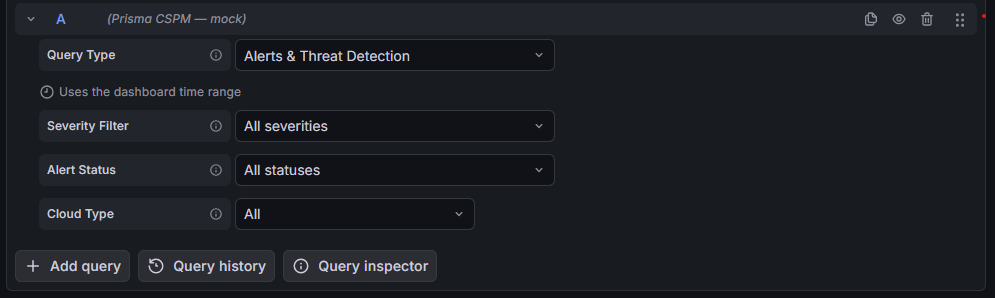
Query Editor
Every query starts with Query Type. Next to it, the editor shows that query type's time-range behaviour, and the remaining fields are the filters that query type supports.

Differentiators
Why Crest Data's Prisma Cloud CSPM Plugin?
Native & Agentless
Talks directly to the Prisma Cloud CSPM REST API from the Go backend. No agents, no exporters, no extra collection layer to deploy or maintain, and strictly read-only.
Fourteen Query Types
Alerts, audit logs, cloud accounts, asset inventory, compliance posture and trend, asset explorer, vulnerability burndown and prioritization, CVE overview, vulnerable assets by CVE, code-to-cloud deploy and runtime trends, and licensing, covering posture, risk, and consumption in one data source.
Posture & Compliance Trending
Current compliance status per standard plus how it trends over the selected range gives security and GRC teams a clear, quantified view of which standards they are failing and whether they are improving.
Risk-Based Vulnerability Prioritization
Prioritized vulnerabilities by category, burndown over time, and per-CVE drill-down with CVSS, EPSS, and impacted-asset context help teams fix what matters first instead of chasing raw CVE counts.
Honest Time-Range Behavior
Only the endpoints that accept an absolute window use the dashboard time picker; every other query type states its time behavior directly in the editor, so a snapshot is never mistaken for a broken filter and panels behave predictably.
Secure by Design
The Access Key ID and Secret Key are stored encrypted server-side, the session token is cached and refreshed automatically, every query is read-only, and upstream failures surface only a generic message while detail goes to the server log. Each query is isolated, so one failure cannot take down other panels.
Built and Maintained by Crest Data
Developed and proactively maintained by Crest Data as a commercial Grafana Marketplace plugin, with continuous compatibility as Prisma Cloud evolves.
How to Get the Plugin
Prisma Cloud CSPM is a commercial plugin on the Grafana Plugin Marketplace
To license it or set up an evaluation, contact the Grafana Marketplace team.
Contact to Purchase
plugins-marketplace@grafana.com
Plugin ID
crestdata-prismacspm-datasource
View on the Grafana Marketplace