

Skip links
Grafana Marketplace Commercial Plugin

SharePoint Plugin for Grafana

Bring SharePoint Online security, compliance, and operations into Grafana


Built for
SharePoint
Grafana Labs
30
Query types
4
Pre-built dashboards
2
Microsoft APIs unified
≥ 12.3
Grafana version supported
Overview

Monitor SharePoint Online and OneDrive directly inside Grafana

Microsoft Graph & Office 365 Management Activity APIs
OAuth2 app-only authentication
Security, compliance, operations, and service health
Read-only, server-side data access

The SharePoint plugin is a backend data source plugin that enables security, compliance, and operational monitoring for Microsoft SharePoint Online and OneDrive for Business directly in Grafana. Security, compliance, and IT operations teams get collaboration-platform visibility in the same dashboards they already use for the rest of their stack.

The plugin connects to the Microsoft Graph API and the Office 365 Management Activity API using OAuth2 client credentials (app-only authentication) to retrieve Microsoft Defender security alerts, DLP policy violations, SharePoint audit events, tenant configuration and drift, file permission audits, site storage and usage reports, user activity, and Microsoft 365 service health, all read-only and all server-side, from a single pane of glass, so teams can watch for risky sharing and policy violations, track adoption and capacity, and catch service incidents without leaving Grafana.

Coverage

What You Can Monitor

The plugin exposes a broad set of query types through a two-step Query Type picker (category, then specific report), spanning security, compliance, operations, and service health, with discovery queries to resolve site, drive, and item identifiers.

Security & Compliance

Security & Compliance

Surface Microsoft Defender for Cloud Apps security alerts (filterable by severity and status), DLP policy violations, and SharePoint audit events from the Office 365 Management Activity API, alongside compliance signals: file and folder permission audits, tenant SharePoint configuration snapshots and drift detection, and report anonymization settings, for a clear view of risk and policy posture.

security alerts DLP violations audit events permissions config drift
Operations & Usage

Operations & Usage

Track site storage usage and capacity quotas, site creations and deletions via the Graph Delta API, and per-site and per-user activity and usage reports across D7 to D180 periods, plus site-usage and activity trend detail (storage, file counts, site counts, page views, active users), to manage capacity and understand adoption across the tenant.

storage quota site delta usage reports activity reports D7–D180
Service Health & Discovery

Service Health & Discovery

Monitor current Microsoft 365 service health, incident history, and Message Center posts to stay ahead of outages, and use discovery and content queries, site, drive, list, and file enumeration and search, plus per-item activity and view analytics, to resolve identifiers and drill into individual sites, lists, and files.

service health incidents message center discovery item analytics
Pre-Built Dashboards

Ready-to-use SharePoint dashboards in Grafana

The plugin ships with four pre-built dashboards covering activity and adoption, operations and capacity, security and compliance, and service health and notifications.
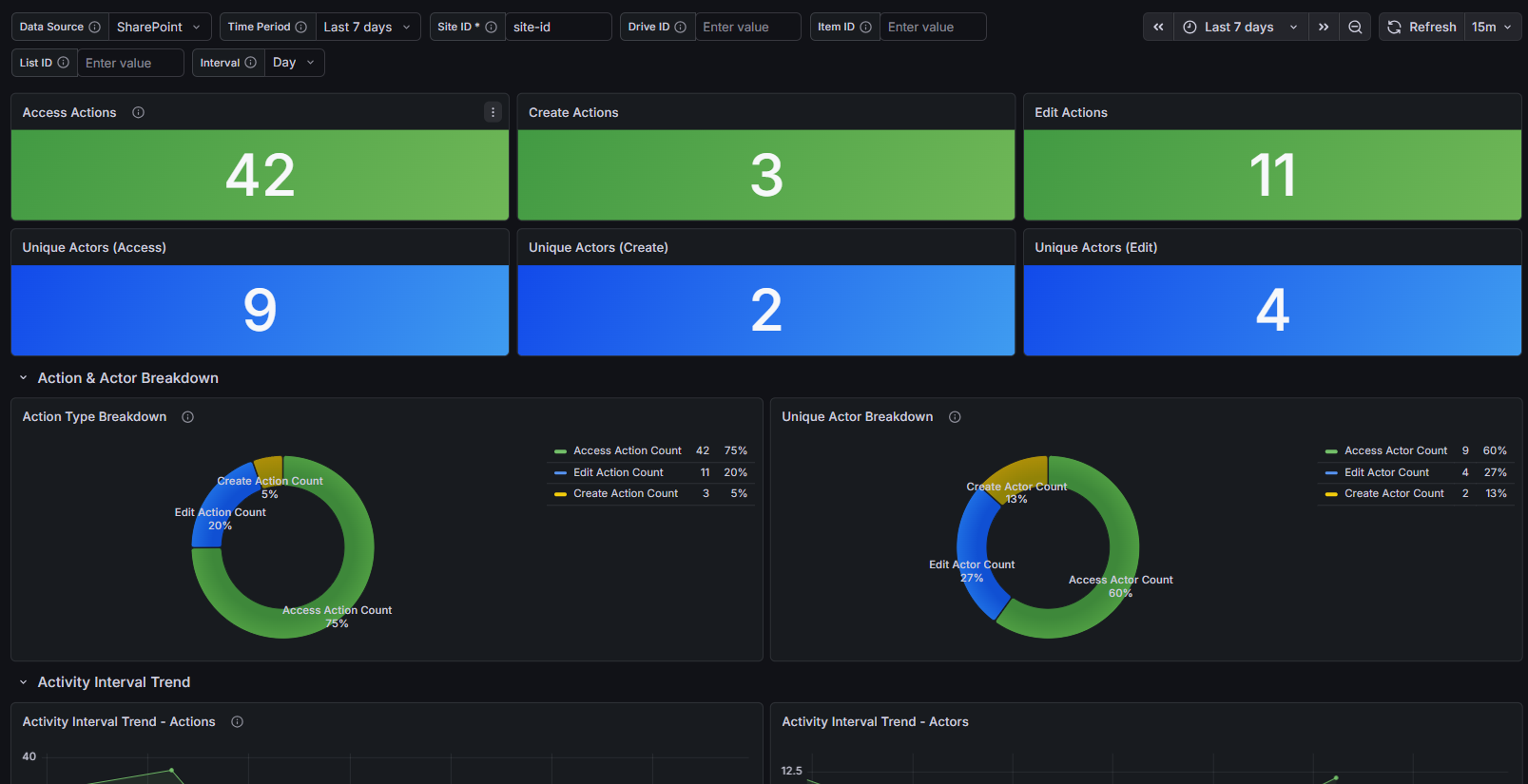
1 / 6
SharePoint Activity and Adoption dashboard in Grafana
01

SharePoint: Activity & Adoption

Per-user and per-site SharePoint activity and usage reports, with activity trend detail for user counts, file counts, and pages visited.
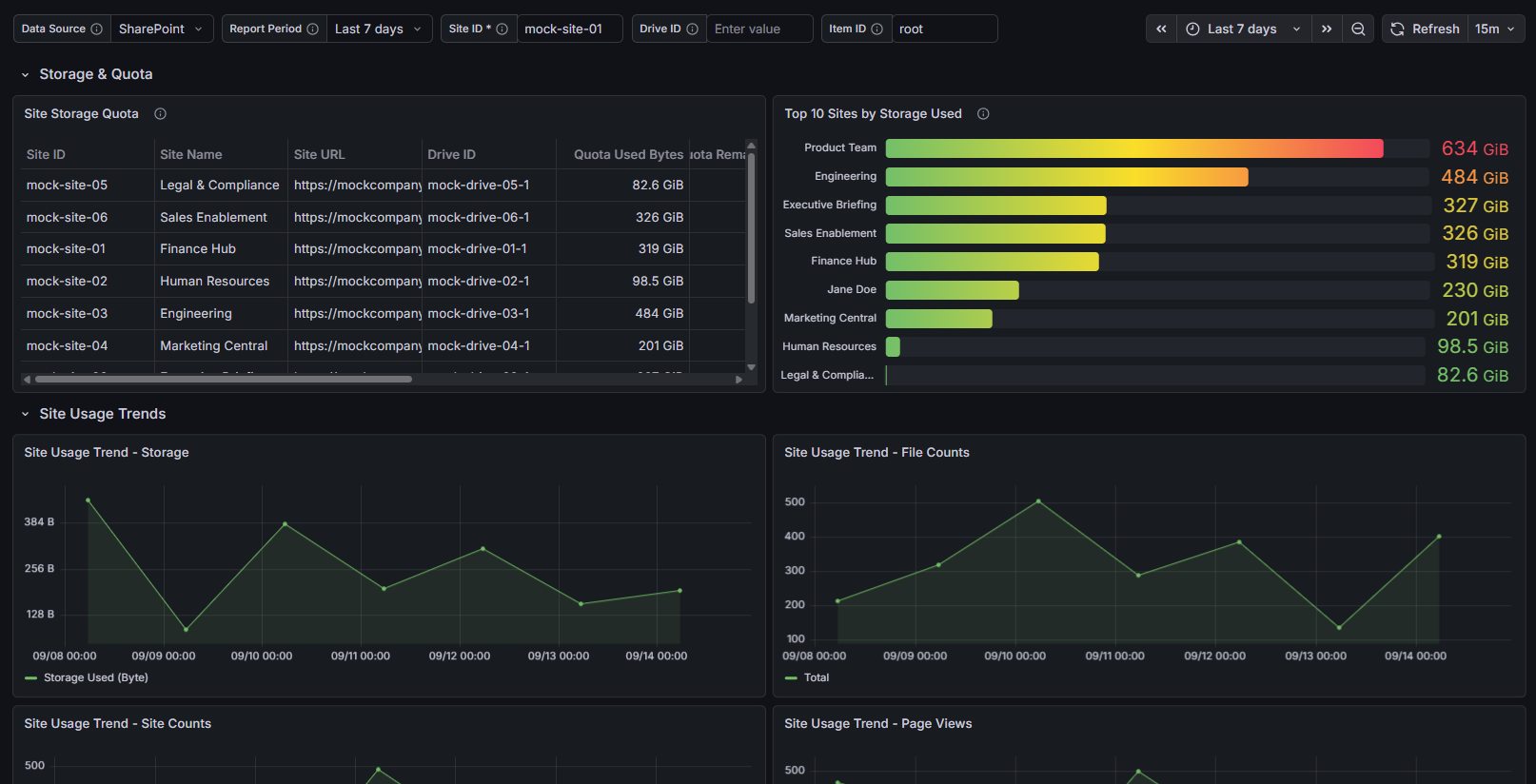
SharePoint Operations and Capacity dashboard in Grafana
02

SharePoint: Operations & Capacity

Storage by site, site delta, user activity, and service health.
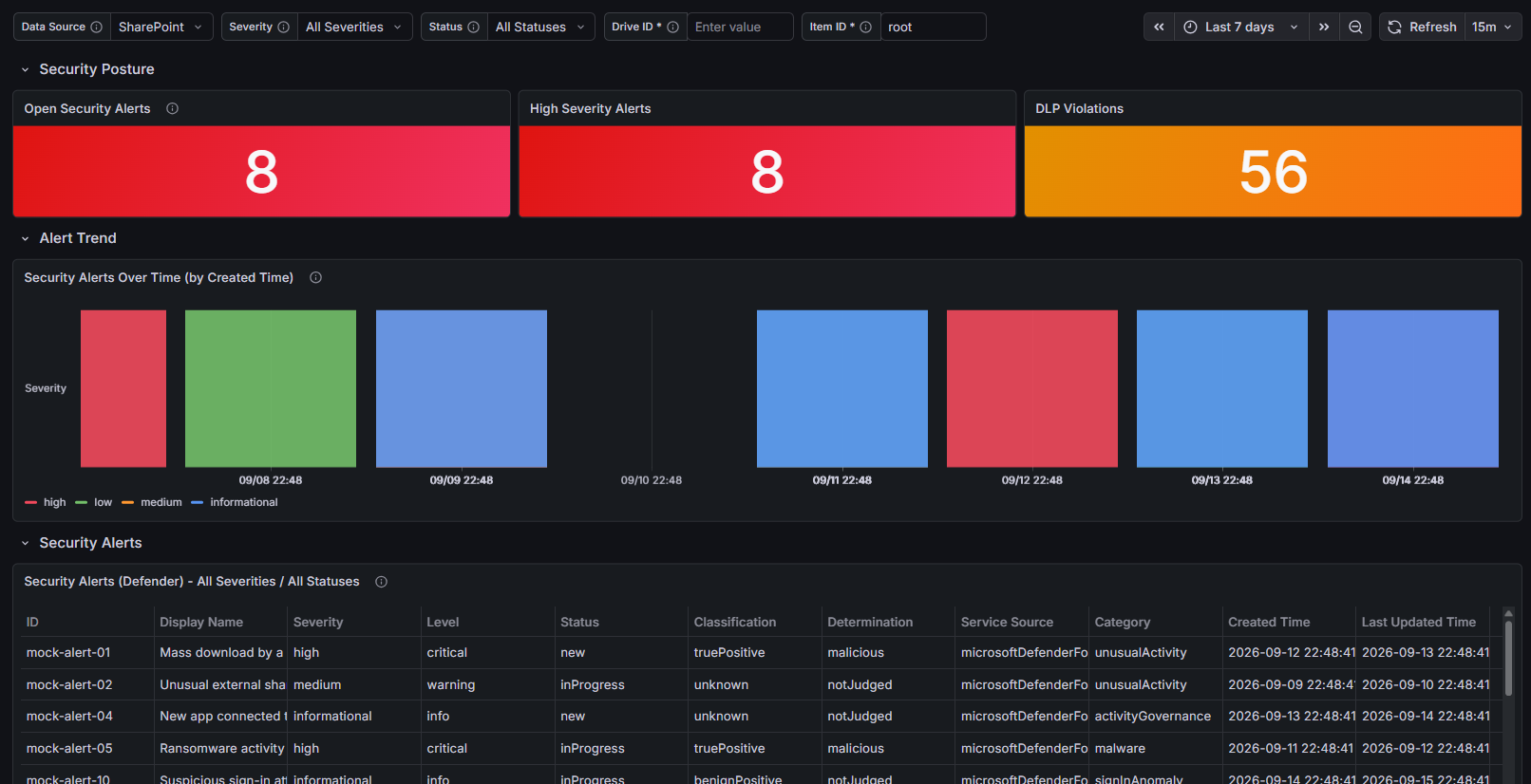
SharePoint Security and Compliance dashboard in Grafana
03

SharePoint: Security & Compliance

Security alerts, DLP violations, audit events, file permissions, tenant settings, and report anonymization.
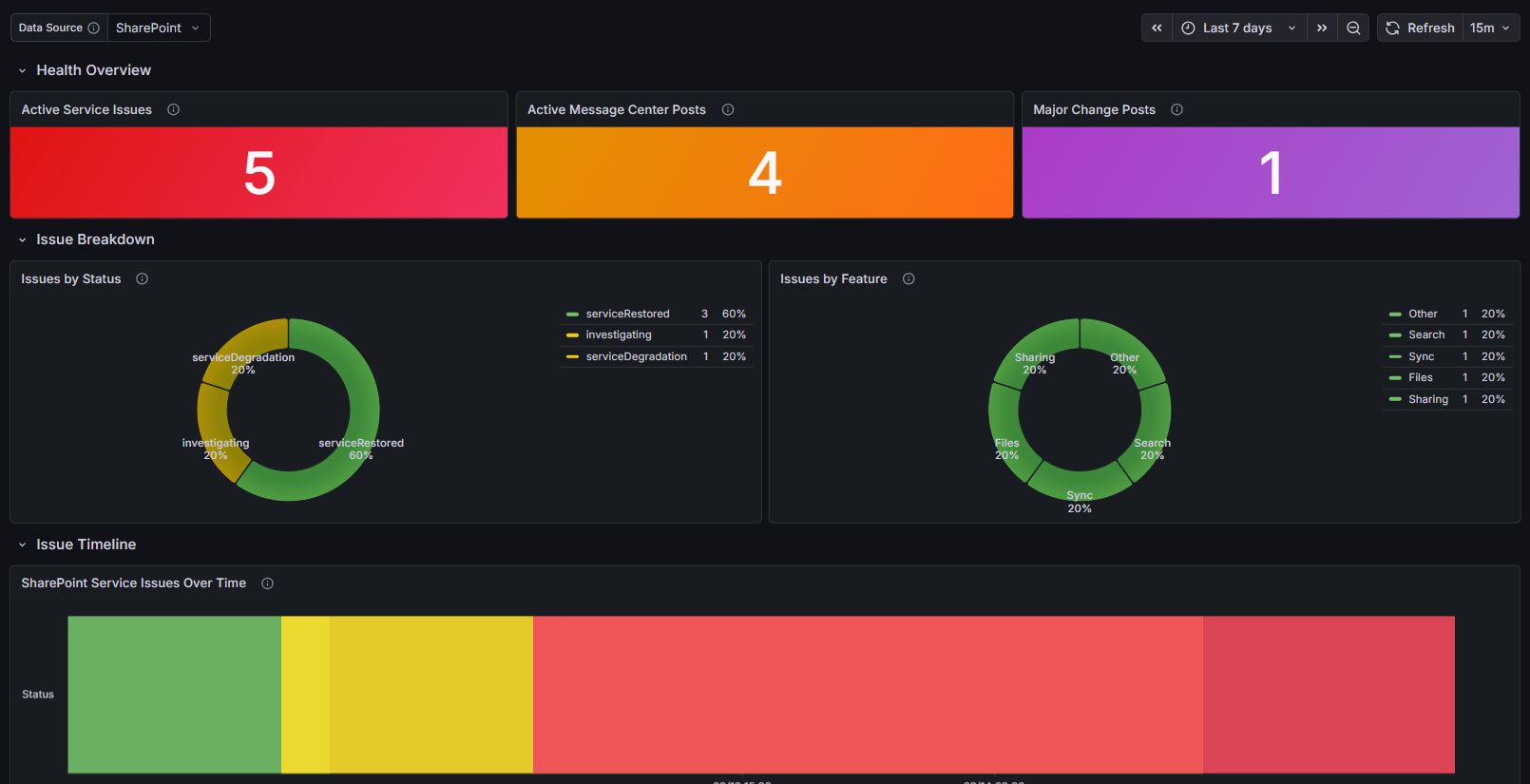
SharePoint Service Health and Notifications dashboard in Grafana
04

SharePoint: Service Health & Notifications

Current Microsoft 365 service health status, service health incidents, and Message Center posts.
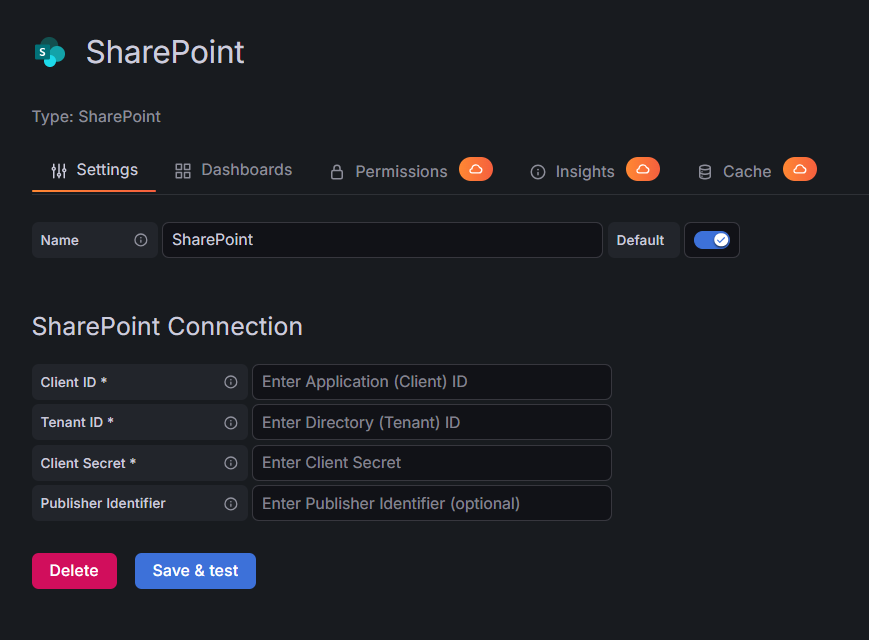
SharePoint data source configuration in Grafana
05

Data Source Configuration

Enter your Client ID, Tenant ID, and Client Secret, with an optional Publisher Identifier for a dedicated Activity API quota, then click Save & Test. The health check will validate your credentials against the Microsoft Graph API.
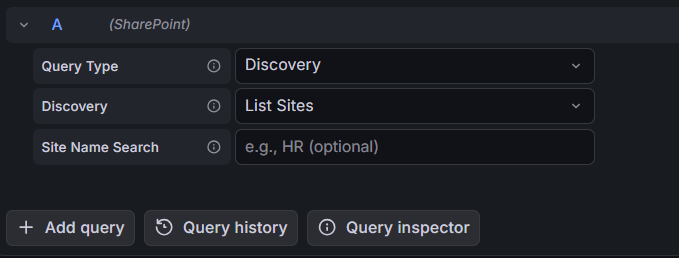
SharePoint query editor in Grafana
06

Query Editor

The two-step Query Type picker selects a category then a specific report; the remaining fields shown depend on which query type is selected.


Differentiators

Why Crest Data's SharePoint Plugin?

Native & Agentless

Talks directly to the Microsoft Graph API and Office 365 Management Activity API with OAuth2 app-only credentials from the Go backend. No agents, no exporters, no extra collection layer to deploy or maintain.

Security, Compliance & Operations in One Data Source

Defender alerts, DLP violations, audit events, permission audits, storage and usage reports, and service health come together in one plugin, so risk, adoption, and capacity live in the same dashboards.

Two Microsoft APIs, Unified

Combines the Microsoft Graph API and the Office 365 Management Activity API behind a single two-step query picker, so teams query security, compliance, and operational data without switching tools or authentication.

CSV Reports as Data Frames

Microsoft's period-based usage and activity CSV reports are downloaded, parsed, and surfaced as native Grafana data frames, so adoption and capacity trends chart directly without any manual export step.

Dedicated Throttle Quota

An optional Publisher Identifier gives the plugin a dedicated Activity API throttle quota instead of the shared per-tenant baseline, keeping queries responsive on busy tenants, with retry and backoff on rate limits and transient failures.

Secure by Design

App-only OAuth2 with least-privilege application permissions, the client secret stored encrypted server-side, automatic token caching and refresh, and every query read-only.

Built and Maintained by Crest Data

Developed and proactively maintained by Crest Data as a commercial Grafana Marketplace plugin, with continuous compatibility as the Microsoft 365 APIs evolve.

How to Get the Plugin

SharePoint is a commercial plugin on the Grafana Plugin Marketplace

To license it or set up an evaluation, contact the Grafana Marketplace team.

Contact to Purchase
plugins-marketplace@grafana.com
Plugin ID
crestdata-sharepoint-datasource
View on the Grafana Marketplace