

Grafana Marketplace
Commercial Plugin
Akamai Plugin for Grafana
Monitor Akamai security events and CDN traffic in Grafana

Built for
2
Akamai APIs unified
6
Security report views
4
CDN metric categories
0
Agents or exporters required
Overview
Monitor Akamai security and delivery directly inside Grafana
SIEM Integration API
Reporting API v2
EdgeGrid HMAC-SHA-256 auth
Single pane of glass
The Akamai plugin is a backend data source plugin that unifies Akamai security events and CDN traffic metrics inside Grafana. It queries the Akamai SIEM Integration API for WAF, bot, and client-reputation attack logs, and the Akamai Reporting API v2 for edge, origin, midgress, and offload traffic metrics, all through native EdgeGrid HMAC-SHA-256 authentication, the standard scheme across Akamai APIs.
Security and platform teams get attack visibility and delivery performance side by side, in the same dashboards they already use for the rest of their stack. Instead of switching between the Akamai Control Center and separate reporting tools, teams can correlate a spike in WAF events with edge traffic patterns, investigate suspicious client IPs, analyze rule matches, and track content offload from a single pane of glass.
Coverage
What You Can Monitor
The plugin exposes two query categories, selectable in the query editor: Security Events from the SIEM Integration API and CDN Traffic Metrics from the Reporting API v2.
01 — SIEM Integration API
Security Events
WAF, bot, client-reputation, HTTP, geographic, and user-risk logs, with applied actions, policies, client IPs by country and city, matched rules and rule tags, and fully decoded rule detail.
clientIPcountrypolicyIdappliedActionrules
02 — Reporting API v2
CDN Traffic Metrics
Delivery performance across four categories — Edge, Origin, Midgress, and Offload traffic — broken down by hostname and response code to understand delivery and cache efficiency.
edgeBytesSumoriginHitsSummidgressBytesSumoffloadedHitsPercentagehostname
See It in Grafana
Set up and query, right inside Grafana
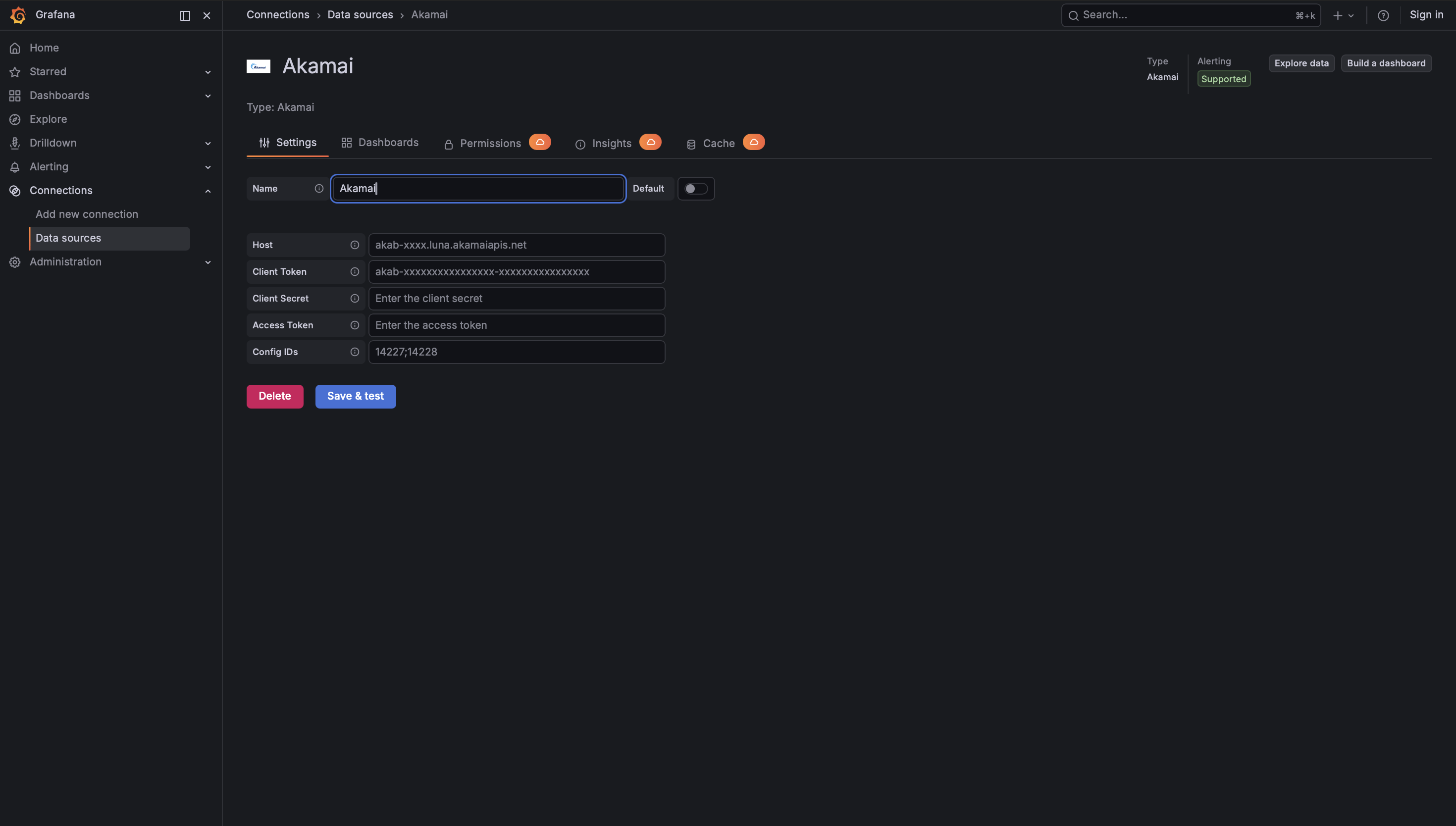
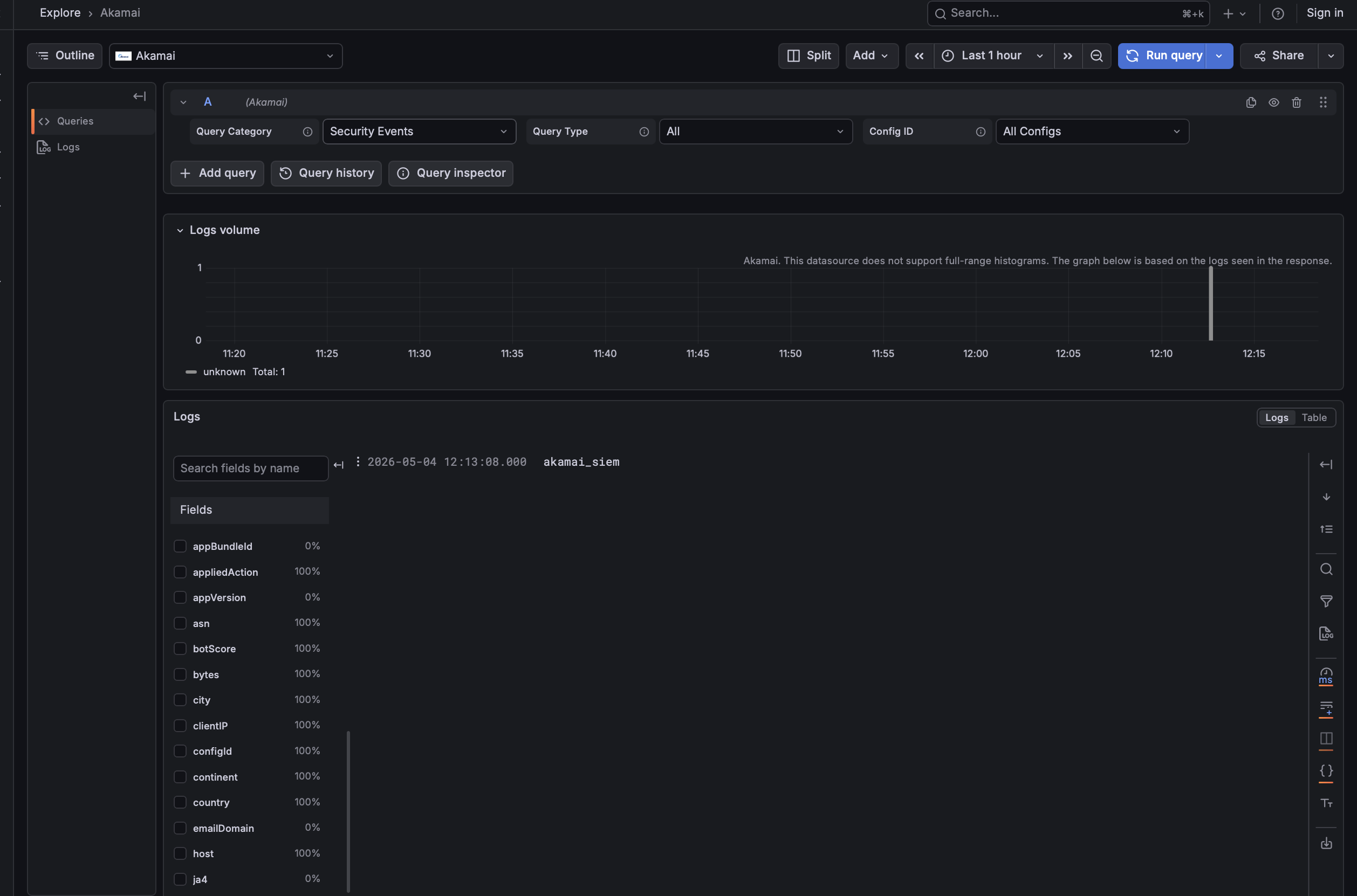
Configure the data source with your EdgeGrid credentials, then build security and CDN queries in a guided editor — no external tooling.
1 / 2

01
Data Source Configuration
Enter your Akamai Host and EdgeGrid credentials (Client Token, Client Secret, Access Token) plus Config IDs, then Save & test.
02
Query Editor
Choose a query category — Security Events or CDN Traffic Metrics — pick a report view or metric category, and run.

Differentiators
Why Crest Data's Akamai Plugin?
Two APIs, One Plugin
Combines Akamai's SIEM Integration API and Reporting API v2 in a single data source, so security events and CDN traffic live in the same Grafana views.
Native & Agentless
Talks directly to Akamai's SIEM and Reporting APIs from the Go backend with EdgeGrid signing. No agents, no exporters, no extra collection layer to deploy or maintain.
Native EdgeGrid Authentication
Uses EdgeGrid HMAC-SHA-256 request signing, the standard scheme for all Akamai APIs, implemented in the Go backend. Client Secret and Access Token are stored encrypted.
Six Security Report Views
Purpose-built views for Security Events (All), Attack Summary, IP Activity, Rule Analysis, User Activity, and Path Analysis, each surfacing the columns analysts actually need.
Resilient by Design
Built-in retry with exponential backoff for transient failures (408, 429, 5xx), with clear, actionable error messages for authentication and access issues.
Built for the Akamai APIs
Handles Akamai's NDJSON SIEM response format, offset-token pagination, and the three-step rule-decoding process, and respects Akamai's rate-limit guidance automatically.
Built and Maintained by Crest Data
Developed and proactively maintained by Crest Data as a commercial Grafana Marketplace plugin, with continuous compatibility as Akamai's APIs evolve.
How to Get the Plugin
Akamai is a commercial plugin on the Grafana Plugin Marketplace
To license it or set up an evaluation, contact the Grafana Marketplace team.
Grafana Marketplace
plugins-marketplace@grafana.com
Plugin ID
crestdata-akamai-datasource
Get the Plugin Now